Notes (Page 3)

27 notes

Note

Serving the answer, not just the tool
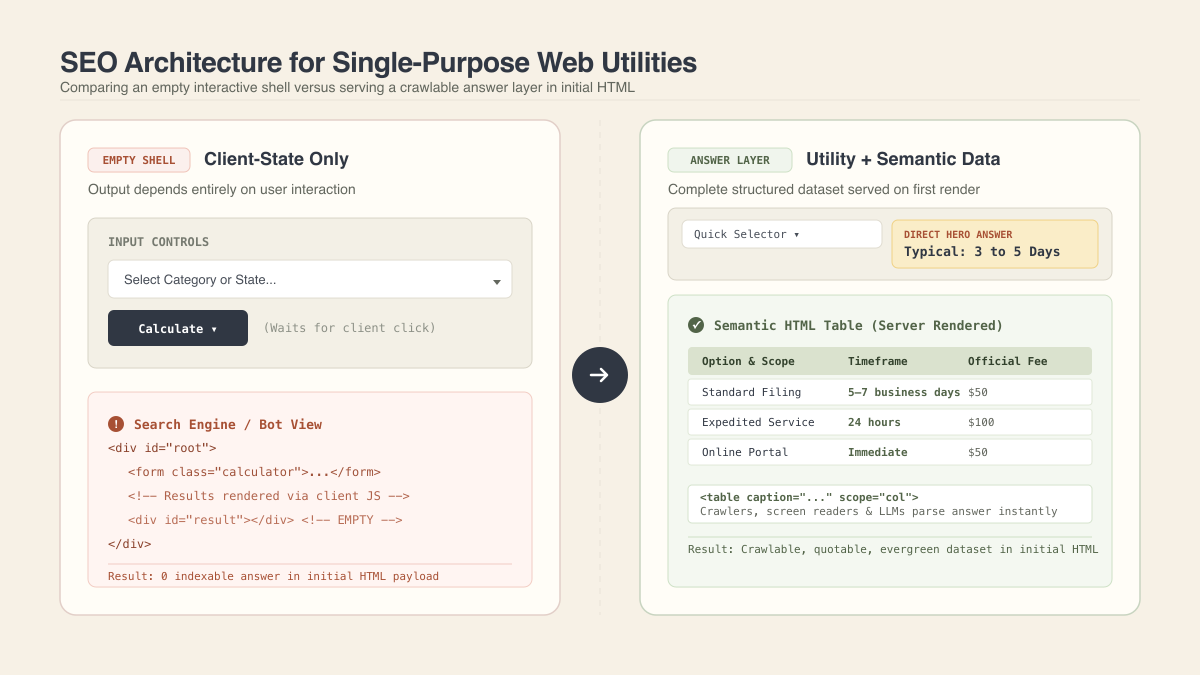
Architecture diagram comparing an empty interactive shell versus serving a crawlable semantic answer layer in initial HTML

When building a web utility, the biggest SEO mistake is serving search engines an empty tool shell.

If the output only appears after a visitor clicks a dropdown or drags a slider, the tool might help a human, but search engines see an empty form. The common agency reaction is generating dozens of programmatic landing pages to compensate. A simpler approach is keeping the single page and presenting the underlying structured data directly beneath the tool in semantic HTML. The page stays an interactive utility while serving as a primary answer source.

Relevance is not about keyword repetition or exact-match headings. It works as a direct sequence: clear question, immediate answer, verifiable detail. You do not need a bloated blog post wrapped around a calculator. A one-sentence hero answer, a brief note explaining what the number covers, and a clean comparison table satisfy search intent faster than competitor filler.

Data tables should be semantic structures rather than visual grids. Using descriptive captions, header scopes, distinct row groups, and functional anchor links helps both screen readers and search crawlers parse the dataset. When dynamic data is injected on the server during the initial render, the page stays fresh without triggering continuous rebuilds.

Volatile figures should never be baked into static graphics. Putting dates or current counts inside an image turns the asset obsolete within days and contradicts the live page. Live numbers belong in the HTML markup. If a data snapshot is missing, a plain “data unavailable” notice builds more trust than stale defaults.

For AI search overviews and model citations, you do not need dedicated markup tricks. Models cite concise, unambiguous statements with clear boundaries. Being explicit about what the data measures and what it excludes makes it safe to quote.

On the product side, utility is about reducing friction rather than adding features. One-click copy, clean print layouts, and objective side-by-side differences between options deliver real value. You rarely need accounts, saved histories, or heavy libraries. The ideal flow remains simple: pick an option, read the answer, compare differences, and copy the result.
Note

Technical SEO is a multiplier, not a reason to rank

Every time a Google core update hits, you see the same story: a site loses its search traffic, panics, and calls an agency.

The agency runs an automated audit and sells them on a full rebuild. They point at low PageSpeed scores, old templates, or weak internal links. It is an easy service to sell because code flaws are visible and billable, while fixing actual content relevance or authority is hard.

The problem is that technical SEO does not give Google a reason to rank your pages. It only helps an already useful site perform. Core updates do not penalize your CSS framework or a missing internal link. They penalize content that no longer satisfies search intent.

Technical SEO is a multiplier, not a starting value. If Google decides your content does not deserve to rank, multiplying zero by a 100 PageSpeed score still leaves you with zero.

Note

Starting with a single table before programmatic pages

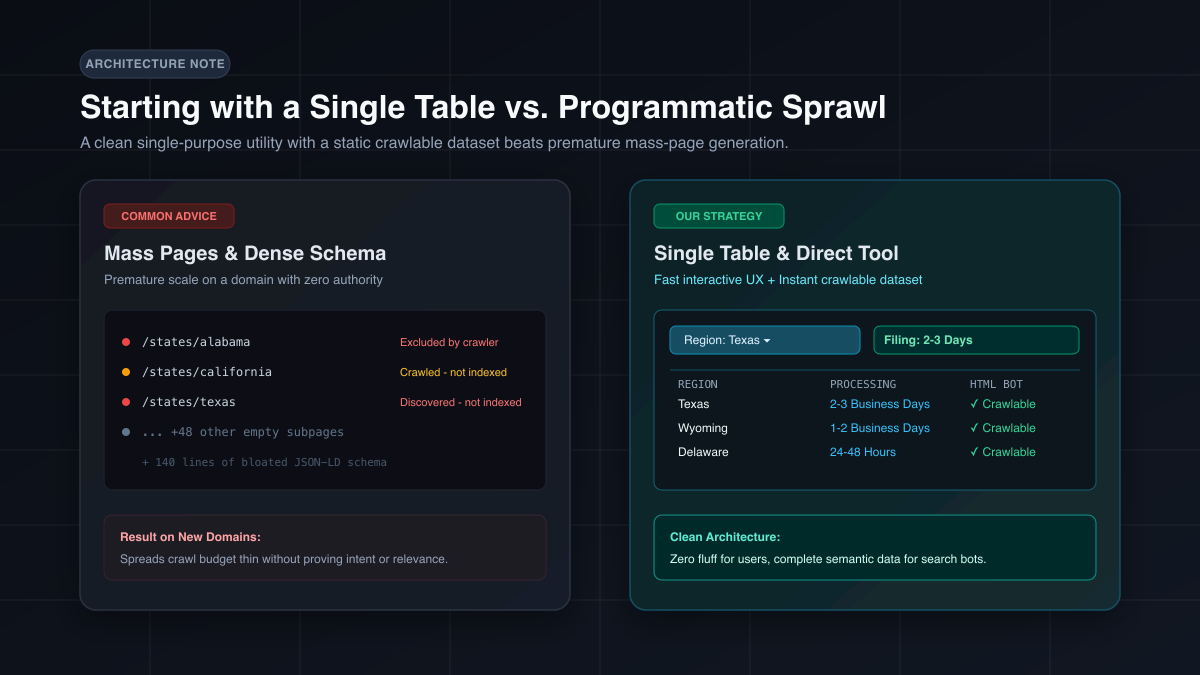
Architecture comparison showing mass programmatic pages and schema bloat on the left versus a single interactive tool with a static crawlable dataset table on the right

When building a new multi-region search utility, the standard SEO playbook is predictable: generate hundreds of programmatic pages right away and cover every edge with dense schema markup.

We decided to do neither.

In an earlier project, we built out programmatic routes early on. The result was underwhelming. When a domain is brand new with zero authority, search engines tend to ignore large batches of automatically generated pages anyway. Rolling out hundreds of subpages before proving core relevance just adds bloat.

As for schema, modern search and language models already parse clean, semantic HTML without needing extensive JSON-LD scaffolding. In practice, heavy markup often just clutters the document.

Instead, we kept it down to one clear starting point: an interactive dropdown that gives visitors their answer in two clicks, paired with a clean, static summary table right beneath it. The user gets zero fluff, and the crawler gets a crawlable dataset on a single page.

If the core utility earns traction, we can always expand into dedicated pages later. Until then, simpler is better.

Note

Ranking a small utility without SEO or backlinks

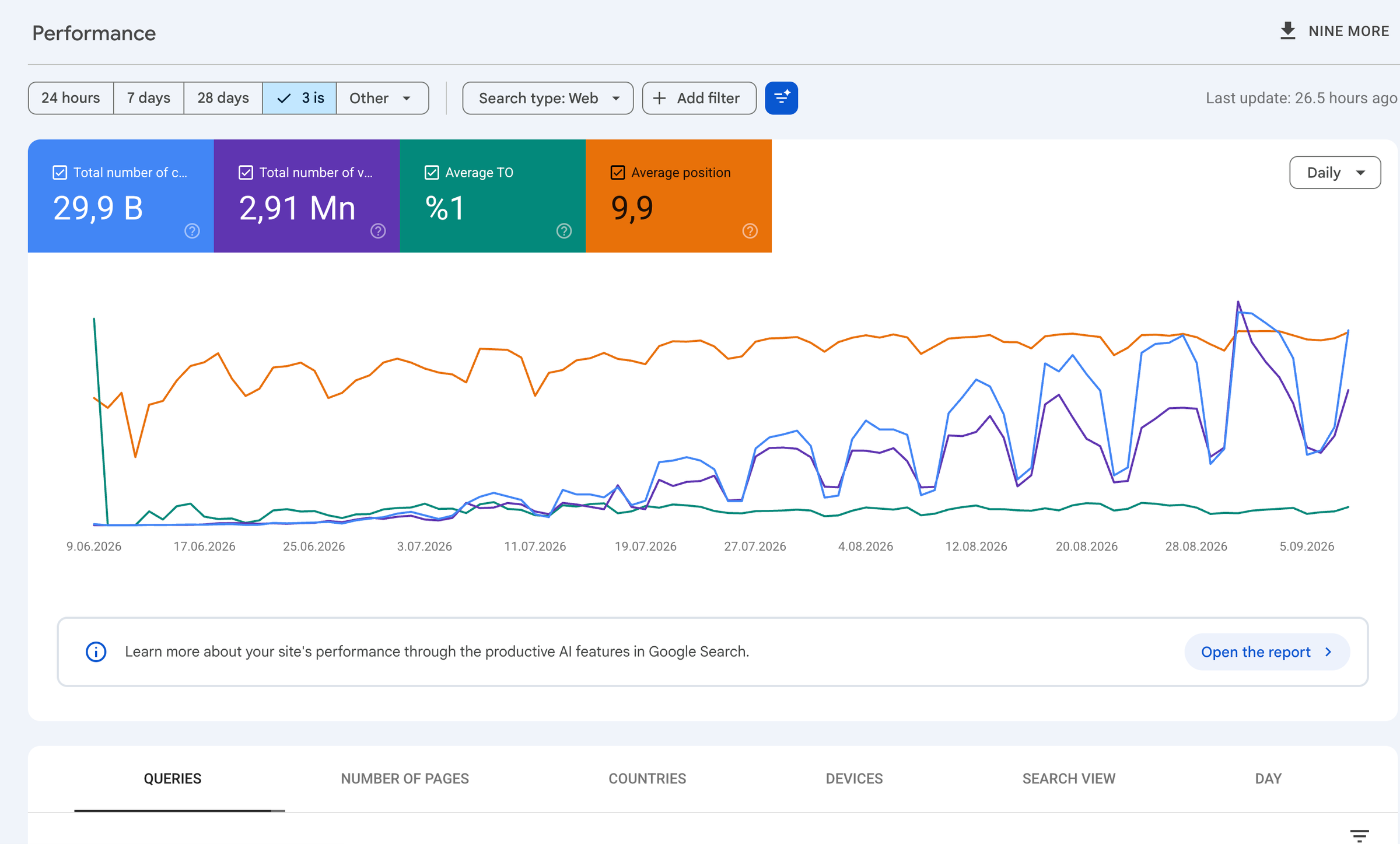
Google Search Console performance report showing 29.9K clicks and 2.91M impressions over three months

Three months ago, we launched a small search utility project. It was just a single-purpose tool, a minimal search form, and a handful of basic pages. We did no backlink outreach and no deliberate SEO work.

At first, I didn’t even submit the site to Google Search Console; it was only registered in Bing Webmaster Tools. Once I noticed it was naturally picking up rankings and clicks on Bing, I finally added it to Search Console.

From there, impressions and clicks kept compounding. Within three months, the tool climbed into the top five positions for several of its core queries, reaching roughly 30,000 clicks and nearly three million impressions.

It was a good reminder that you do not always need complex technical setups or aggressive SEO tactics. When a simple tool cleanly satisfies a specific search intent, search engines can pick it up and rank it on utility alone.

Note

Letting my wiki spot notes worth sharing

I added a small flow to my LLM wiki to spot things worth sharing while I work or bring in new information.

Hooks capture the conversation; the agent keeps possible notes in a private list with their sources. I choose what gets published, and a publishing skill prepares a short Trace note.

The mechanics passed local checks. I still need to see how useful the suggestions are in everyday work.

Note

Muse gives a personal AI agent its own computer

Meta’s Muse launch caught my attention. It looks promising: a personal AI agent you can message through its own app or WhatsApp, with a dedicated computer where it can keep working on your tasks.

That computer is a persistent, isolated Linux environment with a browser. Meta says Muse can work across connected apps, fill out forms, and continue after you close the app. You give it a task or a longer-term goal, and it comes back with progress, suggestions, or a request for approval.

The controls are part of the product. You choose which apps it can access, review its activity, and approve sensitive actions such as sending an email or making a purchase. Meta says passwords are stored separately from the main agent, which can use them without seeing them.

I haven’t tried it yet. What interests me is the combination: a familiar messaging interface, a computer that stays available, and a way to check what the agent is doing on your behalf.

Note

Why I made Trace

I take notes while working on projects. I try something, sometimes drop it, and sometimes a detail that seemed unimportant changes my decision. These notes stay in my private wiki.

Some of them are worth sharing. But turning a note into a separate piece of writing takes extra work. I made Trace to reduce that work.

Here, I’ll share small pieces from what I do: the reason behind a decision, an observation from an experiment, a detail I noticed later. Each one doesn’t need to be a long article. It just needs to make sense on its own.

My source notes are in Turkish. An agent will help me prepare the pieces I select in English and publish them, without adding conclusions I didn’t make or turning uncertainty into certainty.

That’s what I want from Trace: to share the worthwhile parts of things I’m already thinking about, with less effort.

Each note has a permanent link.

Back to top

Search notes

↑ ↓ to move · Enter to open · Esc to close